
1. Roles between the developer (development organization) and the operator (operations organization) for S/W supply chain security
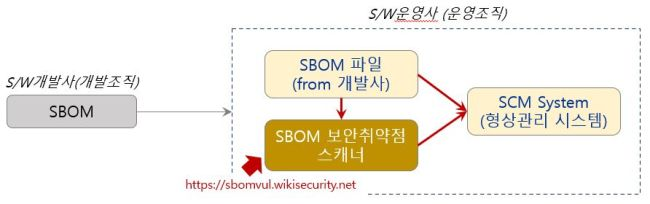
- For security and compliance management of open source in the S/W supply chain, the S/W vendor and the user should consider a management system in which their roles are divided.
- The S/W vendor is responsible for generating, in SBOM format, the open source used in the developed S/W, removing license issues and security vulnerabilities, and distributing it.
- The S/W user is responsible for using the SBOM received from the vendor to regularly check newly disclosed security vulnerabilities and license issues, and for responding to the related compliance.
- From the S/W user’s standpoint, even with the SBOM provided by the vendor and the results of security vulnerability removal, a situation in which security vulnerabilities are newly disclosed while the software is being received or while it is in use is unavoidable.
- In other words, because the S/W vendor’s SBOM generation cycle and the cycle at which security vulnerabilities are disclosed are different, a sound approach is for the S/W user to regularly check and risk-assess security vulnerabilities in the open source registered in the SBOM provided by the vendor, and to respond to compliance and threats.

2. SBOM security vulnerability scanner for S/W operators
- One cost-effective strategy for an S/W user regarding S/W supply chain security is to integrate an SBOM vulnerability scanner with the SCM (Software Configuration Management) system the organization operates, and to respond to S/W supply chain security compliance and threats.
- That is, use an SBOM vulnerability scan engine to regularly scan the SBOM received from the S/W vendor for security vulnerabilities so that monitoring and requests for vulnerability removal can be made, and use the SCM system the organization uses to maintain configuration control of the SBOM file provided by the manufacturer and of the vulnerability scan result file.
3. SBOM OSS vulnerability scanning website
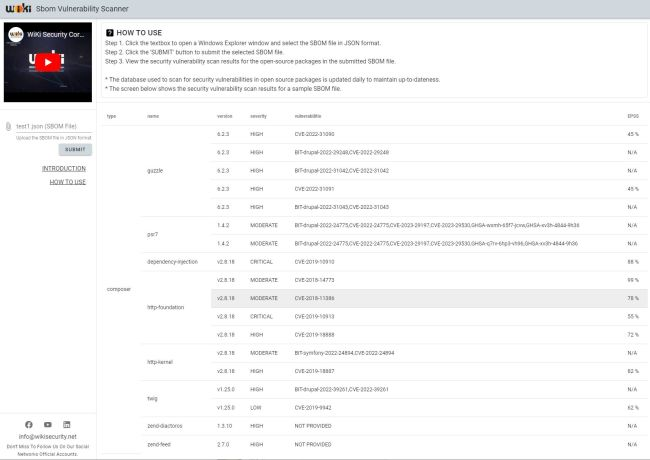
How to use: SBOM Vulnerability Scanner https://sbomvul.wikisecurity.net/
Step 1. Click the text box and select a JSON-format SBOM file through the Windows Explorer window.
Step 2. Click the ‘SUBMIT’ button to submit the selected SBOM file to the server.
Step 3. Check the security vulnerability inspection results for open source packages in the submitted SBOM file.